Jobs & production
Turn customer orders or internal demand into jobs. Keep quantities, due dates, materials, operations and travelers connected from release through completion.
 AI Inventory Pro.
MEET WINDFIRE ERP · MANUFACTURING ERP
WindFire Manufacturing ERP by AI Inventory Pro brings manufacturing, inventory, people, finance and quality into one connected workspace. Less re-entering. A clearer next step. More time for the work that matters.
Built for CNC shops, fabricators, and OEM manufacturers.
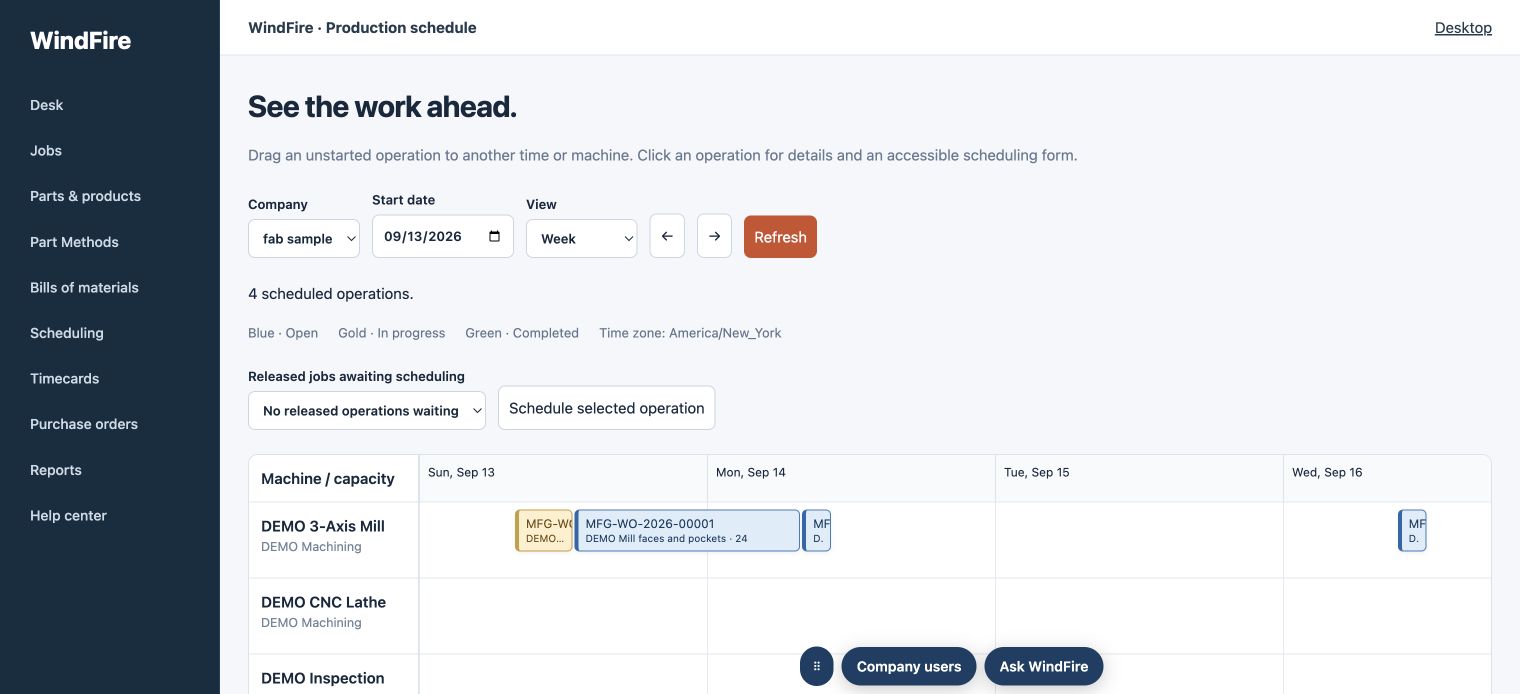
See it. Plan it. Keep it moving.
Jobs, machines, and production steps in one view.
01 / EXPLORE THE PLATFORM
Start with the work you need to do. Explore the modules and workflows that connect your front office, shop floor and quality team. Availability follows your company’s enabled modules, setup and permissions.
33 capabilities to explore
Turn customer orders or internal demand into jobs. Keep quantities, due dates, materials, operations and travelers connected from release through completion.
Build simple parts or multi-level assemblies. Keep component requirements separate from production steps, with independent child jobs for components made in-house.
Reuse proven sequences, instructions, tools and workstation choices. Each job gets its own method copy, so edits do not change the template or another job.
Plan released operations around workstation capacity, production sequence and material availability. Review downtime decisions and protect work already underway.
See production progress and bring job instructions, quantities, reference images and barcodes to the floor with printable travelers and labels.
Report breakdowns, assign repairs, record time and parts, and plan recurring upkeep. Connect workstation downtime to production planning.
Explore schedule changes in plain language, review conflicts and use supported Undo. The assistant works through the scheduling services and protects job details and due dates.
Build and follow a job as a flow chart: the part, its materials, the method steps and the release on one canvas. It uses the same checks as the job forms, and released or finished jobs stay protected.
Find stock across warehouses and storage locations, down to shelves, drawers and bins. Set replenishment defaults for made and purchased items.
See what needs buying, manage suppliers and purchase orders, and follow materials into receiving. Keep native approval and stock rules in place.
Receive purchase orders and prepare customer shipments from a shared dock workflow. Keep receipts, deliveries, couriers and material certificates connected.
Manage vehicles, drivers, trips, registration and insurance reminders. Record incidents and link vehicle repairs and upkeep to maintenance.
Organize tools by use and storage, record issues and returns, and follow usage and calibration. Connect the right resources to production work.
Manage the products you supply at customer locations. Connect stock counts, usage forecasts and replenishment recommendations, then review the sales orders needed to keep customers supplied.
Draw your facility on one full-screen canvas: buildings, departments, workstations and storage as real WindFire ERP records. Every change is saved as you go, logged with before-and-after values, and can be undone.
Follow the customer relationship from quotation to order, production and delivery. Manage returns and credits with their original transaction references.
Run every order as one line: quote, sales order, make or buy, ship, deliver, invoice and paid. Start with a quote or go straight to the order, repeat a past order, and always see the next step.
Bring customer invoices, vendor bills, payments, journals and financial reports together. Follow receivables, payables and month-end work in one place.
Upload your bank transactions and match them with your banking records, wherever you are. Downloading transactions directly from your bank, through Plaid or Stripe Financial Connections, is currently available only in the United States, once it is switched on for your workspace. Imported bank lines do not automatically post to the ledger; payment links depend on provider setup.
See open projects, responsibilities, deadlines and late tasks. Switch to your own tasks while keeping work connected to the wider operation.
Maintain asset records and review production, stock, labor costs and financial results with reports scoped to permitted company locations.
Connect employees, departments, working schedules and effective-dated labor rates. Keep private pay information restricted to authorized people.
Capture shifts, breaks and job activity through personal/mobile Tracker and shared-workstation workflows using the same backend time records.
Run payroll from a guided home: the next pay day, setup steps with checkmarks, pay structures, pay periods, overtime and pay slips. Payroll tax preparation is still being built; tax calculation and filing are not assumed.
Learn in the working page with guided lessons. Assign courses, review progress, and resume or restart training in six supported languages.
Record inspections alongside the parts and work they concern. Follow quality issues and corrective actions without separating them from daily operations.
Connect quality planning, inspections, corrective actions, audits and controlled procedures in one system. Build and review your quality evidence alongside the manufacturing work it supports.
Track individual equipment identities, calibration events and use history. Manage quarantine, due dates and retirement alongside the workstations that use them.
Manage revisions, approvals, effective dates, reading assignments and acknowledgments. Make the effective procedure available at the production step. Part of WindFire QMS.
Prepare response plans and role-specific packets. Track exercises or incidents, reconcile paper notes and review restart checks. Part of WindFire QMS.
Plan audits, record findings and follow corrective actions. Bring quality results, risks and objectives into management reviews with decisions, owners and follow-up.
Bring in your existing quality documents, review gaps, build your quality manual and rehearse with evidence-based mock audits. Keep confirmation and publication under your control.
Ask for guidance, review operational information and develop supported proposals. Actions require a displayed proposal, explicit confirmation and fresh permission checks.
Give your company its own site and database. Manage users, roles and location access, with server-side checks for records and enabled modules.
Guide company setup and bring in existing data with mapping and review. Configure email and integrations around your business before going live.
Move between related records with shared navigation and contextual guidance. Work in English, Spanish, French, German, Brazilian Portuguese or Simplified Chinese.
No matching modules. Try another word or choose All modules.
02 / FROM ORDER TO OUTPUT
A shared workflow connects your production plan to the people doing the work.
Create the job, select the part and method, and capture the quantity, dates, location, and PO.
Release the job to the floor before allocating its operations to machines and time slots.
Use travelers, sequence instructions, barcodes, and timecards to record what happens.
Follow production progress, inspect the results, and connect finished work to inventory and invoicing.
03 / INSIDE WINDFIRE ERP
Current Desk captured October 6, 2026. Other views show an earlier demo release.
Screens are shown in English. Request a demo in your preferred language.
The current Desk brings production, office tools, training, WindFire Quality, Procedures and Recovery plan together. Access follows your company and role.
04 / AN EXTRA PAIR OF EYES
Wia helps your team learn the system, review operations and prepare supported actions. The public guide below explains the product; in-app Wia works within your workspace permissions.
In-app actions require a proposal, your confirmation and server checks. This website’s assistant cannot read or change your company records.
How would WindFire ERP help my CNC shop?
Bring your part methods, jobs, machine schedule, and production time together. Start with a part and its machining steps, then follow the job through release and completion.
Illustrative example. Open the assistant for a live conversation.
BUILT TO WORK TOGETHER
WindFire ERP builds a guided manufacturing workspace on Frappe and ERPNext. Shared records and services connect the work, while native transaction validation stays underneath.
Office, production floor, personal/mobile Tracker and shared workstations. Common navigation, contextual help and six languages.
Inventory, purchasing, people, maintenance and quality support the same operational records instead of separate copies in each module.
Permissions, company and location scope, method copies, time records and workflow validation are checked on the server. Wia uses named services with confirmed actions.
Tenant Admins manage their own workspace. Platform Super Admin manages the service across tenants. Separate datasets do not imply a dedicated server for each company.
Example: an assembly order. An order creates demand. Its BOM lists components; its method describes the work. Manufactured components can have child jobs. Time and material transactions connect execution to costing, with approval and validation at each required step.
BUILT AROUND YOUR BUSINESS
Independent customer workspaces keep company datasets separate. Company administrators manage their team, with permissions controlling what each person can use.
Combine everyday manufacturing tools with advanced scheduling, AI, accounting, and other modules. Module availability, user allowances, and location allowances are managed for each subscription.
Switch between English, Spanish, French, German, Brazilian Portuguese, and Simplified Chinese, with localized help documentation.
A FEW GOOD QUESTIONS
Manufacturers that manage parts, materials, production steps, machines, and jobs—especially CNC shops, fabricators, assembly teams, and companies making their own OEM products.
Yes. A company can manage multiple locations with access restrictions. Your subscription’s location allowance and user allowance can be adjusted by the platform administrator.
Accounting is available as a module, including invoicing, payments, banking records, and financial reports. Company-specific accounts, taxes, opening balances, and processes need to be configured during onboarding.
WindFire ERP supports barcode workflows and configurable product label layouts. Printer model, label size, and scanner behavior should be checked as part of your demo and setup.
Tell us what you make, your locations and the workflows you want to improve. We’ll explore the relevant modules and discuss your requirements directly.
Absolutely—tell us what you make, how you plan production, and where the process gets difficult. We can discuss a demo around your needs.
LET’S TALK ABOUT YOUR SHOP
Tell us a little about your business. We’ll help you explore how WindFire ERP could fit your operation.
info@aiinventorypro.com ↗Prefer a quick product question?
Each company has its own workspace and database, with server-side access controls. WindFire Guard supports these safeguards with recurring security checks and incident follow-up.