ERP FOR CNC MACHINE SHOPS

ERP for CNC machine shops:
every job connected, from order to shipped part

Machine shops lose time between systems: the order lives in one place, the router in another, and floor status in someone's head. WindFire keeps the sales order, the job, the schedule and the operators' time in one system, so everyone sees the next step.

01

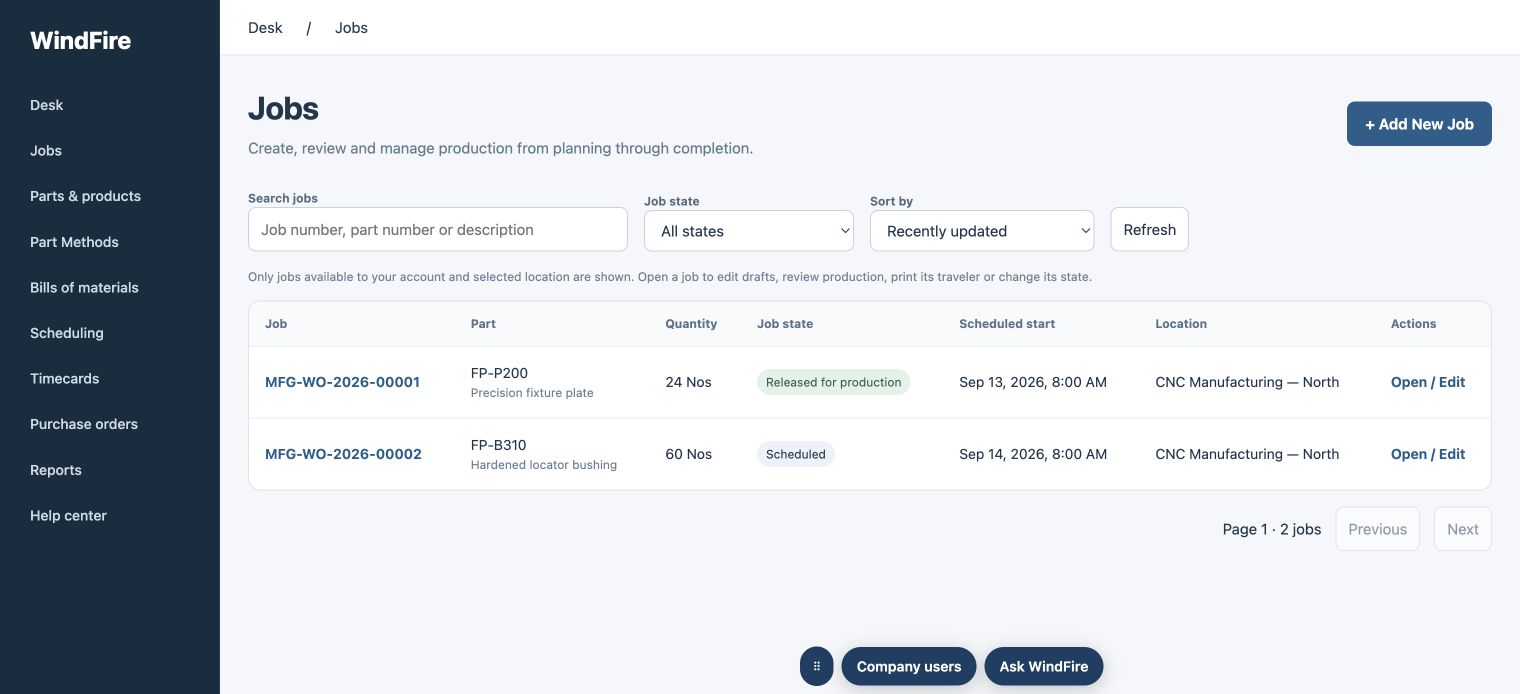
From submitted sales order to draft job in a few clicks

Choose eligible lines from a submitted sales order, and WindFire fills each draft job from the part and order: bill of materials, materials, operations, warehouses, customer PO and dates. Create draft jobs for eligible lines together, then review them before release. Lines without a bill of materials are skipped with a reason.
WindFire ERP
WindFire ERP jobs list with demo CNC parts and production states
Product screen · demo data · earlier release
02

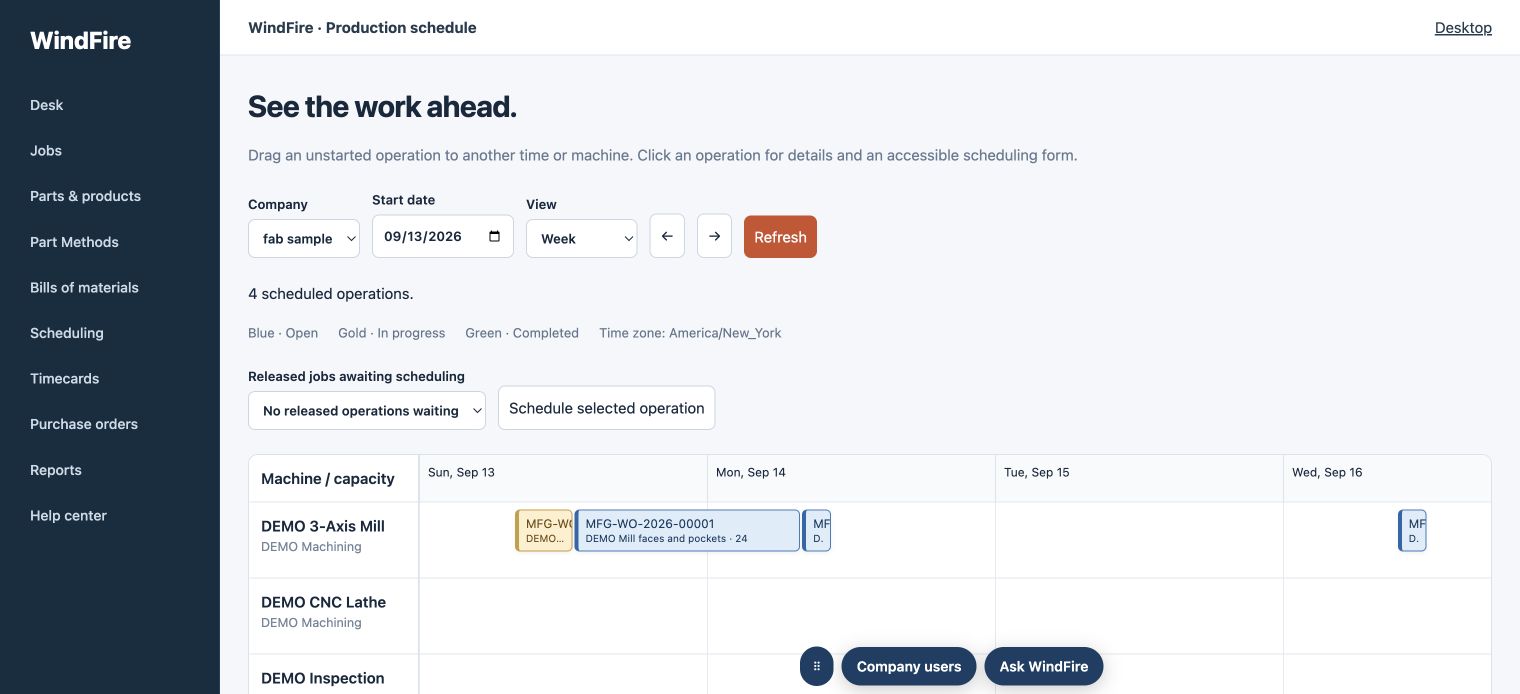
A schedule that respects workstation capacity

Set each workstation's working hours, holidays and capacity, and the scheduler places operations within them, in step order. On the Schedule Board, drag an unstarted job to a new start and WindFire keeps capacity and step order enforced. Jobs already started or on hold cannot be moved this way.

WindFire ERP
WindFire ERP schedule showing demo machining operations by workstation
Product screen · demo data · earlier release
03

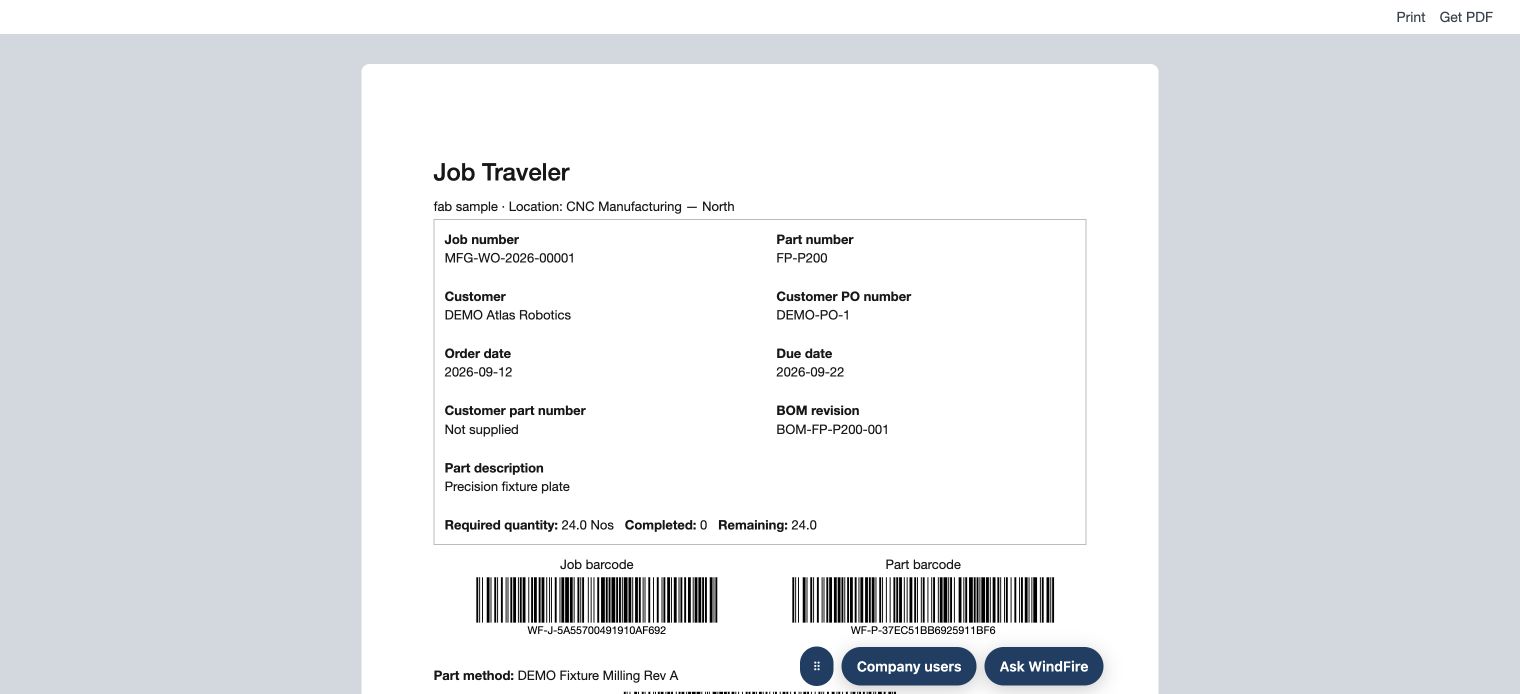
A traveler for every job

Print the job traveler: job, part, quantity, BOM revision and method, then each numbered step with its workstation, planned time and completed quantity, with barcodes for the job and each step.

WindFire ERP
WindFire ERP job traveler with quantities, steps and barcodes
Product screen · demo data · earlier release
04

Operators start work on the job in front of them

Operators begin and end work on a job step in WindFire Tracker, on a phone, tablet or desktop screen, or at a shared Desktop Tracker station with their PIN. Each operator sees their own history: pieces made, time, and completed or partial steps.

05

Planned against actual, step by step

Method Flow shows each step's planned setup and run minutes beside what recent jobs actually took, drawn from Tracker time, and the shop cost per piece for any quantity.

06

See job cost and margin as work progresses

Cost and profit on every released job: the price, material used, scrap written off, machine and labor at your workstation rates, and outside processing. Job costing shows cost to date and estimate to finish against the job's original estimate, and flags jobs whose margin falls below your target.

07

When the floor needs more material

An operator reports a short or scrapped bar from the floor; stores or a production manager approves it, and shortages can be bought straight from the job.

08

Checks recorded, not on paper

Quality inspections record incoming and production checks: what was checked, the readings and whether it passed. The WindFire Quality Management System is available as an add-on.

09

Your whole crew, in their language

What people write, including Tracker job instructions, reaches each person in their chosen language: English, Spanish, French, German, Portuguese (Brazil) or Chinese. Names, codes and part numbers stay as written.

10

Bring your shop's data with you

Your company administrator can bring in customers, parts, open orders and jobs from QuickBooks or another ERP, review what WindFire found, and undo the import if something is wrong.

A FEW GOOD QUESTIONS

CNC shop questions

Is WindFire a job shop ERP?

Yes. It runs from eligible submitted sales order lines to draft jobs, scheduling, operator time, job cost and quality checks, for shops making parts to order.

How do operators record time on jobs?

In WindFire Tracker on a phone, tablet or desktop screen, or at a shared Desktop Tracker station with a PIN.

Does the schedule account for machine capacity?

Yes. The scheduler places operations within each workstation's working hours and capacity, in step order. Started or on-hold jobs have movement limits.

Can we bring in data from our current system?

Yes. The company administrator uploads exports from QuickBooks or another ERP, reviews the mapping, and can undo the import.

LET’S MAKE IT ABOUT YOUR SHOP

See WindFire run a machine shop

Tell us what you make and how you plan production. We can discuss a demo around your needs.