CNC machine shops
Orders to draft jobs, capacity scheduling, travelers, operator time and job cost.
CNC machine shops WindFire ERPby Ai Inventory Pro
METAL FABRICATION ERP SOFTWARE
Fabrication work passes through many hands: cutting, forming, welding, outside finishing, inspection and shipping. WindFire keeps each step on the job, so the office, the floor and the dock work from the same plan.
A FABRICATION JOB, START TO FINISH
Each step works from the records the step before it created.
Write the quote with parts, quantities and prices. Make order turns an accepted quote into a sales order.
Create draft jobs from the order's lines. The part's bill of materials, materials and steps fill each job.
Release job shows Ready, Warnings or Blockers, reserves available stock and turns purchased shortages into draft purchase requests.
Steps are placed by workstation capacity, working hours and step order. A job's first step waits for missing material.
Operators record setup, pieces, partial runs and rework in Tracker. The next step can start as soon as the last pieces are in.
Record the inspection on the job step, then ship from the order on the Shipping & Receiving page.
Shared records. Clear handoffs. People in control.
Walk through your own workflow01 / SCHEDULE
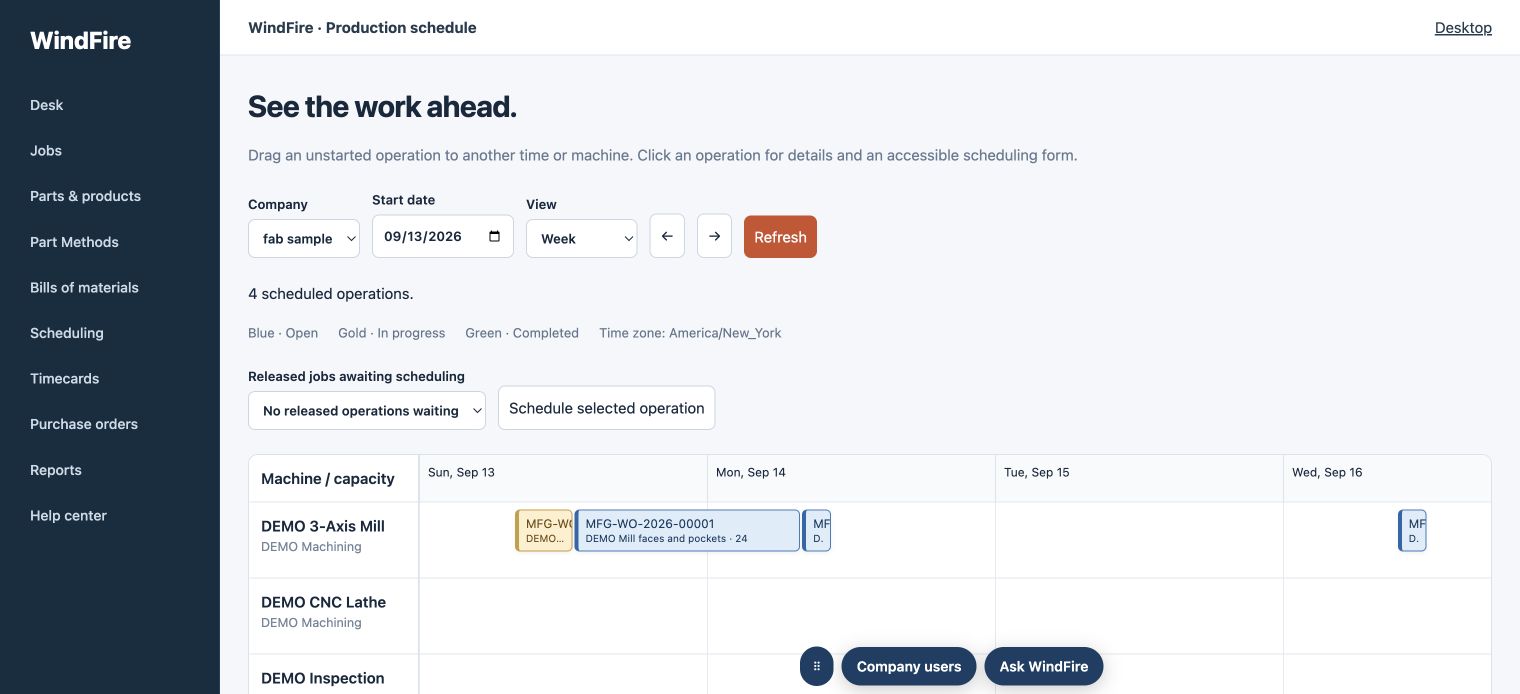
The Schedule Board shows each work center as a row and each job as a bar, with its steps in order. Cells turn from green to red as a work center fills, and the busiest one at 85% or more is named as the bottleneck.
02 / FLOOR
Operators record each step of the work order in WindFire Tracker, on a phone, tablet or desktop screen, or at a shared Desktop Tracker station with their PIN.
03 / COST
Job costing shows what each job makes while it runs: price, cost to date, the estimate to finish and expected profit, against the job's own estimate.
04 / MATERIAL
When a cut comes up short or a piece is scrapped, ask for more material on the job or from the floor. Stores or a production manager approves it, the scrap is written off, and shortages can be bought from the job.
WINDFIRE QMS ADD-ON
Record the heat or lot number and the certificate as material is received, have a quality manager review it against the purchase order, and confirm the lots used on each job. Certificate packs for customers combine a certificate of conformance with the material certificates.
WindFire records what was checked; it does not test the material.
IS THIS A FIT?
A FEW GOOD QUESTIONS
Yes. Steps are placed within each workstation's working hours, holidays and capacity, in step order, and a job's first step waits for missing material. The Schedule Board shows the load on every work center.
Operators record each step in WindFire Tracker: setup percent, pieces or percent made, and whether the run was completed, partial or rework. Cumulative and remaining quantities update after each report.
Yes. Outside processing is costed at the supplier's bills for the job's purchase order line, alongside material and shop time at each step's hour rate.
No. WindFire does not nest parts or read CAD or DXF files. Keep your nesting and CAM software for that work and run the jobs, schedule and costs in WindFire.
LET’S MAKE IT ABOUT YOUR SHOP
Tell us what you make and how you plan production. We can discuss a demo around your needs.