Mills and lathes
3-axis mills, 4-axis mills with an A or B rotary table, 5-axis head-head, head-table and table-table (trunnion) machines, and X/Z lathes. Part view plots the tool tip on the workpiece; Machine view moves the table, head and axes.
 WindFire ERPby Ai Inventory Pro
FREE CNC TOOL
Open a CNC program and see it run: the toolpath, the machine moving and the stock being cut, with the code and the 3D view kept in step. It runs in your browser and your program never leaves it.
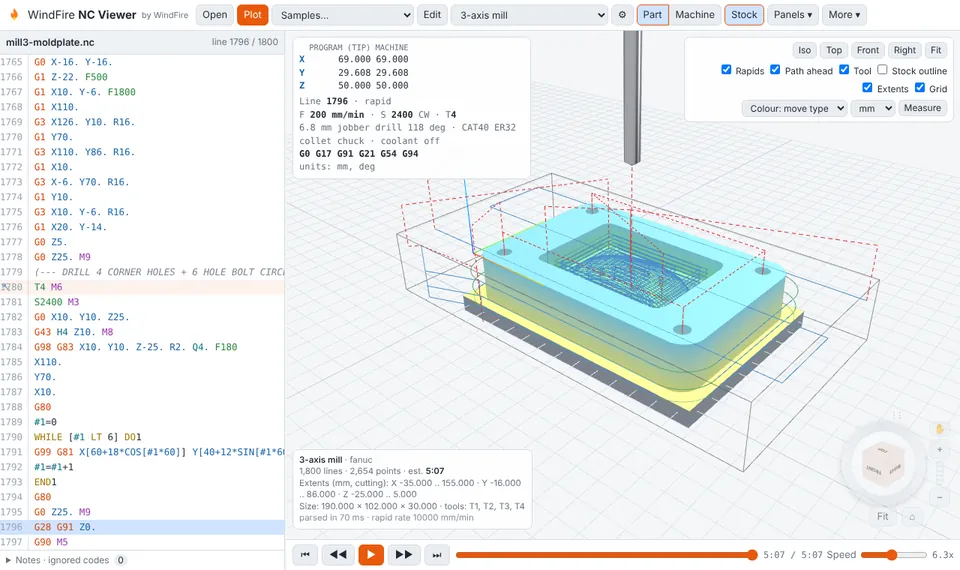
3-axis mills, 4-axis mills with an A or B rotary table, 5-axis head-head, head-table and table-table (trunnion) machines, and X/Z lathes. Part view plots the tool tip on the workpiece; Machine view moves the table, head and axes.
Click a line, or use the arrow keys in the editor, to move the tool to the end of that block. Click the toolpath to jump to that point and its line.
Watch material come off a stock block as the program plays, and see collisions the stock simulation finds.
A tool and holder library is matched to the program. The viewer works out the reach each tool needs, flags long reach, and flags when a tool holder or collet nut touches the stock.
Edit the program, find and replace (with match case, whole word and regular expressions), go to a line, re-plot and save (download) the result.
Play, pause and step block by block at adjustable speed, measure, colour by move type, Z or tool, and switch between mm and inch.
Programs with macro variables, loops, drill cycles and subprograms plot, and codes the viewer does not need are listed and left exactly as written.
Your program is processed only in your browser and is never uploaded. Free, with no sign-up. Works with mouse or touch.
For prove-out viewing only, not a certified collision simulator. Machines are generic; set pivot lengths and limits for yours.
FREQUENTLY ASKED
Yes. It is free to use in your browser, with no sign-up.
No. Your program is processed only in your browser and is never uploaded.
Generic 3-axis mills, 4-axis mills with an A or B rotary table, 5-axis head-head, head-table and table-table machines, and X/Z lathes. You set pivot lengths and axis limits in the machine settings.
No. It is for prove-out viewing only, not a certified collision simulator. Its stock simulation, reach and holder checks help you spot problems before you go to the machine; always prove out on the machine as usual.
Yes. Touch works: one finger orbits, two fingers pan and zoom.
WHEN A SPREADSHEET STOPS BEING ENOUGH
WindFire keeps the sales order, the job, the schedule and the operators' time in one system: draft jobs from sales order lines, scheduling by workstation capacity, printable travelers with barcodes, and operator time recorded on the job.
Takt time vs cycle time vs lead time explained with formulas and a worked line-balancing example: find the bottleneck and how many operators you need.
Read the guideHow to calculate OEE (overall equipment effectiveness) step by step: availability, performance and quality, with a worked example and how to use it.
Read the guideHow to calculate job cost in a manufacturing shop: materials, labor and applied overhead, with a worked example and an estimate-vs-actual review.
Read the guideTakt time, stations needed and daily capacity from shift time, demand and cycle time.
Open the toolRoll up material, scrap, labor and overhead into a cost per unit and per batch. Export to CSV.
Open the toolPrint QR-coded bin, shelf and location labels on standard Avery sheets, made in your browser.
Open the tool